The Security System Motion Detector: Placement, Sensitivity, and Pet Immunity
When a home security system false alarms in the middle of the night—or worse, fails to trigger during an actual break-in—the culprit is often not the sensor itself but how it was installed. The motion detector is the unsung workhorse of any modern security setup. Yet, it’s also the most misunderstood component.
Call Now for Professional Motion Detector Installation
Proper placement, sensitivity calibration, and pet immunity features separate a reliable system from one that drives you (and your neighbors) insane with nuisance alerts. In this guide, you’ll learn the professional secrets to making your motion sensors work flawlessly—without sacrificing safety for convenience.
Key Risk: Poorly placed motion detectors cause up to 70% of false alarms in residential systems. That leads to police response fees, ignored alerts, and a false sense of security.
Why Motion Detector Placement Matters More Than You Think
A motion sensor doesn’t “see” like a camera. It detects changes in infrared energy (heat) or uses microwave pulses. If you place it near a radiator, kitchen, or sunny window, the sensor will mistake shifting heat for an intruder. Place it too high or behind an object, and it becomes blind.
The Three Deadly Placement Mistakes
- Heat sources – HVAC vents, fireplaces, direct sunlight, or refrigerators. These create false triggers every time the temperature shifts.
- Stairwells – A sensor facing a staircase may not detect someone climbing until they are already on top of it. Vertical movement is harder to register.
- Obstructions – Large furniture, glass panels, or even hanging plants block the detection beam.
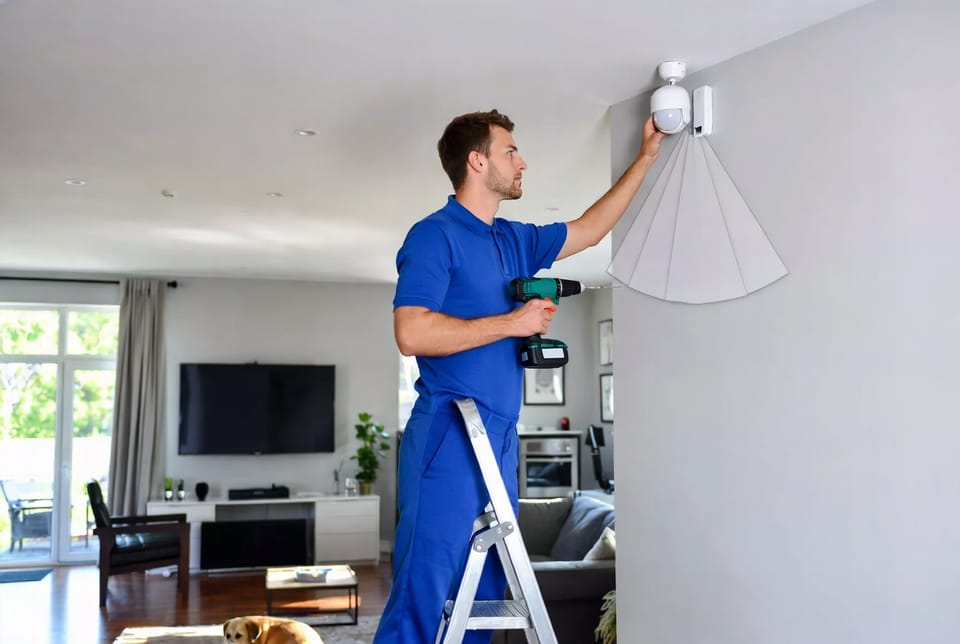
Pro Rule: Always mount motion detectors in a corner, 6–8 feet high, with the lens angled slightly downward. This gives you a 90° to 110° wide coverage pattern with a clear “look” across the room, not toward windows or vents.
Sensitivity Adjustment: The Fine Line Between Secure and Annoying
Most homeowners leave sensitivity at factory default—a mistake. Sensitivity controls how much heat movement is required to trigger an alarm. Too high, and a curtain swaying from AC will set it off. Too low, and an intruder crawling below the beam may go undetected.
How to Adjust Sensitivity Correctly
- Walk test mode – Most panels have a “test” setting. Enable it, then walk across the room at different speeds and heights.
- Reduce by 10–20% if you get false alarms from pets, curtains, or small rodents.
- Increase by 5–10% in large rooms or basements where an intruder might stay far from the sensor.
Warning: Never max out sensitivity thinking it’s “safer.” It’s not. It creates alert fatigue—you’ll start ignoring real alarms.
Use the sensor’s pulse count feature (available on mid-to-high-end units). Set it to 2 or 3 pulses before triggering. That means the sensor needs to see movement across two or three detection zones before alarming—ignoring tiny disturbances.
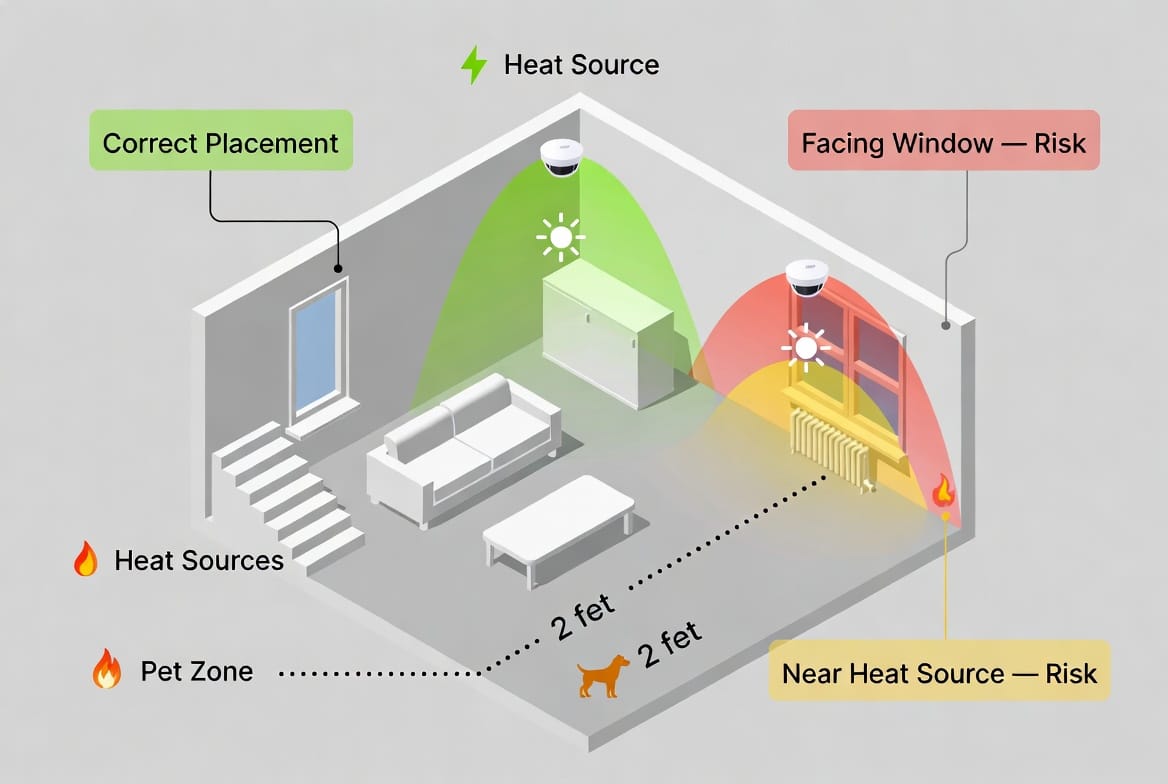
Pet Immunity: How It Works (And When It Fails)
Pet-immune motion detectors are lifesavers for dog and cat owners. But the marketing is often misleading. A sensor labeled “pet immune up to 80 lbs” doesn’t mean it ignores all animals—it means it ignores heat signatures and movement patterns typical of animals under that weight.
Two Types of Pet Immunity
| Feature | How It Works | Best For |
|---|---|---|
| Weight-based filtering | Ignores signals from objects below a set weight (e.g., 40–80 lbs). | Dogs/cats that stay on floor level. |
| Zone masking | Blankets the lower 2–3 feet of detection. | Active pets that jump on furniture. |
Critical Pet Immunity Limitations
- Does NOT ignore humans crawling – A burglar on hands and knees will still trigger a pet-immune sensor if they move slowly enough? No. Actually, most pet-immune sensors detect any large heat signature moving across multiple zones. A crawling adult still triggers it.
- Fails with multiple pets – Two 40-pound dogs walking together can exceed the sensor’s weight threshold.
- Not for free-roaming birds or cats on counters – Cats jumping onto shelves move into the human detection zone.
Best Practice: Even with pet immunity, do not place a motion detector in a room where your pet spends unsupervised time. Use door/window sensors instead for those areas.
How to Test Pet Immunity After Installation
- Let your pet walk through the room normally.
- Walk your pet while carrying them (this mimics a larger animal).
- Crawl on the floor yourself at different speeds.
- Adjust the sensor’s lower zone mask if available (many Honeywell and DSC sensors have physical jumpers for this).
If your pet triggers false alarms more than twice a week, either disable that sensor during the day (via panel scheduling) or replace it with a dual-technology motion detector (PIR + microwave), which is far more resistant to pet false triggers.
Placement Rules for Specific Home Areas
Living Rooms & Open Floor Plans
- Mount in a corner opposite the main entry.
- Avoid pointing toward a fireplace or TV (TVs emit heat).
- Distance from floor: 6.5–7.5 feet.
Hallways & Corridors
- Use curtain mode sensors (long, narrow coverage).
- Place at the end of the hallway, not the middle.
- Never face two motion detectors toward each other—they can interfere.
Basements & Garages
- Highest risk area for false alarms due to temperature swings.
- Use dual-tech sensors (PIR + microwave) only.
- Set sensitivity 10% lower than upstairs.
Stairwells
- Place the sensor at the top of the stairs facing down, not at the bottom facing up.
- Reason: Someone coming up the stairs triggers earlier, and the sensor sees horizontal movement once they reach the top landing.
The Sensitivity Sweet Spot: A Professional Formula
Every sensor has a sensitivity dial (usually 1–10) or digital setting. Use this rule of thumb:
- Small room (<15ft x 15ft): Setting 4–5
- Medium room (15–25ft): Setting 6–7
- Large room (>25ft) or basement: Setting 7–8
- Room with pets under 50lbs: Setting 3–4 + pet immunity ON
- Room with pets over 50lbs: Setting 2–3 + dual-tech sensor required
After setting sensitivity, run the walk test for 3 full minutes from all angles. If you get more than 1 false trigger during testing, lower sensitivity by 1 full point.
When to Call a Professional (Even If You’re DIY-Happy)
You can install a basic motion detector yourself. But tuning it—placement, sensitivity, pet immunity zones, and integration with your full alarm panel—requires experience.
Signs You Need Professional Installation
- You have three or more pets over 30 lbs each.
- Your home has radiant floor heating or large south-facing glass walls.
- You’ve already tried moving the sensor twice but still get nighttime false alarms.
- You want the sensor wired (not wireless) for maximum reliability.
A certified technician will:
- Perform a site survey with a thermal camera to identify heat interference.
- Use a sensitivity meter to dial in exact pulse counts.
- Mask physical zones on the sensor lens to block specific problem areas.
- Integrate the motion detector with automation rules (e.g., disarm when you arrive home).
Pro Tip: Ask the installer to leave the sensor’s LED light ON for the first week. It blinks when motion is detected—so you can see false triggers in real time and decide whether to adjust placement or sensitivity.
Final Checklist: Your Motion Detector Is Correctly Installed If…
- ✅ It does not trigger when your pet walks through the room.
- ✅ It does trigger when you walk normally at night.
- ✅ It never faces a window, vent, radiator, or TV.
- ✅ It is 6–8 feet high, angled down, in a corner.
- ✅ You have run a walk test three times with zero false alarms.
- ✅ Pet immunity is enabled and tested with your actual pet’s behavior.
Conclusion: Effective Motion Detection Requires Proper Placement
A motion detector is only as smart as its installation. You can buy the most expensive pet-immune sensor on the market, but if you mount it facing a sunny window or above a heating vent, it will false alarm constantly. Worse, you’ll lose trust in your entire security system.
Get the placement right. Adjust sensitivity methodically. And if you have pets—especially multiple or large breeds—invest in dual-technology sensors with real pet immunity, not just marketing claims.
Don’t leave your home’s safety to guesswork.
Call a licensed security professional today for a motion detector placement audit and sensitivity calibration.
Stop False Alarms – Call a Security Expert Today